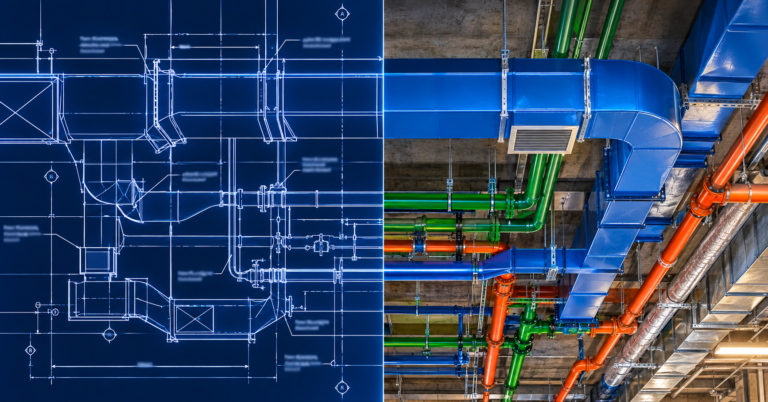

LOD 400 is the level of BIM detail where a model stops being a coordination tool and becomes a fabrication tool. At LOD 400, the model shows every duct, pipe, tray and hanger at its real size, along with the connections, supports and spool breaks a shop needs to build it.
For mechanical, plumbing and electrical contractors, that difference matters. In fact, a model that looks complete on screen can still cost you days on site if your team built it to the wrong level. So this post explains what LOD 400 actually includes, how it differs from LOD 350, and how to tell whether your project needs it.
LOD levels in plain terms
LOD stands for Level of Development. However, it describes how much you can rely on a model element, not just how detailed it looks. The industry reference is the BIMForum LOD Specification, which sets out what each level means for each building system.
| Level | What the element is | Typical use |
|---|---|---|
| LOD 100 | A symbol or placeholder showing something will exist | Early massing and cost planning |
| LOD 200 | A generic object with approximate size and location | Schematic design |
| LOD 300 | A specific object with accurate size, shape and location | Design development and drawings |
| LOD 350 | LOD 300 plus the interfaces with other systems | Trade coordination and clash detection |
| LOD 400 | LOD 350 plus the detail needed to fabricate and install | Shop drawings, spooling, prefabrication |
| LOD 500 | A field-verified record of what the team built | As-builts and facility management |
Most design teams and BIM consulting services deliver somewhere between LOD 300 and LOD 350. As a result, the jump to LOD 400 usually falls on the trade contractor, because it is the trade that has to build it.
What LOD 400 includes for MEP trades
An LOD 400 model carries everything a fabricator or installer would otherwise have to work out on site. For example, on MEP scopes it typically includes:
- Ductwork with real gauges, fitting types, seam and connection details, plus section lengths the shop can build and ship.
- Piping split into spools with the right joint types (grooved, welded, threaded or press), valves, flanges and true insulation thickness.
- Hangers and supports with set sizes, rod lengths and attachment points that line up with the structure above.
- Electrical cable tray, conduit racks and large bore conduit with bend radii and fittings the crew can build as drawn.
- Equipment built from manufacturer submittal data, including service and access clearances.
- Sleeves and penetrations at their final size and location, so the crew can set them before the pour.
The real test is simple. Could a shop cut material from this model without re-measuring? If the answer is no, then the model is not LOD 400, whatever the title block says. In short, this is the level of detail behind the benefits of BIM modeling that contractors actually feel on site: fewer field fixes and more work in the shop.
LOD 350 vs LOD 400: where projects get caught out
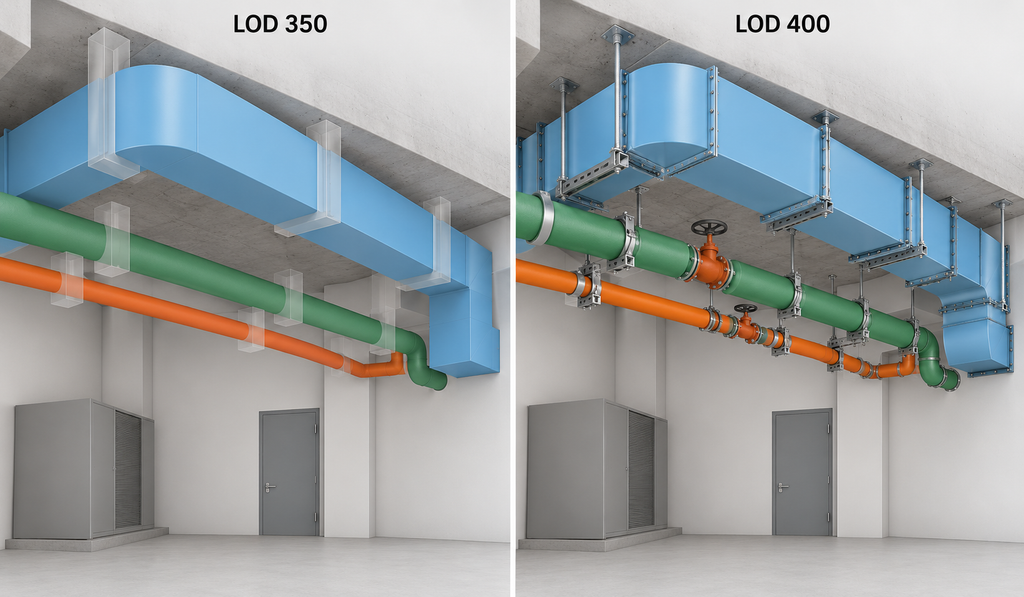
LOD 350 answers the question “does it fit?” In contrast, LOD 400 answers “can we build it exactly like this?” The gap between the two is where most rework comes from.
| LOD 350 | LOD 400 | |
|---|---|---|
| Main purpose | Coordinate systems and clear clashes | Fabricate and install |
| Hangers and supports | Reserved space, often generic | Sized and tied to the structure |
| Fittings and joints | Representative | Actual fitting types and connection methods |
| Section lengths | Continuous runs | Split to shop and transport limits |
| Who usually owns it | Design team or coordinator | Trade contractor or its BIM partner |
| Main output | Coordination model, clash reports | Shop drawings, spool sheets, fabrication files |
A common problem starts when a team signs off a model at LOD 350 and then sends it to the shop. The runs clear each other on screen. But once real fittings, insulation and supports go in, they no longer do. Catching that early is part of good BIM coordination. That is why the handoff between design and trade models needs a clear LOD agreement in writing.
When you need LOD 400, and when you don’t
Not every project, or every part of a project, needs fabrication-level detail. In fact, modelling everything to LOD 400 costs time that some areas will never pay back.
LOD 400 usually earns its cost when:
- You prefabricate spools, duct sections, multi-trade racks or modular risers.
- Ceiling spaces or plant rooms are so tight that every hanger and insulation layer counts.
- The project is a hospital, lab, transit station or data centre, because dense services leave little room for field changes.
- The contract or the GC’s BIM execution plan asks for fabrication models before install.
On the other hand, it is often overkill when:
- Work runs in open, unfinished spaces with plenty of clearance.
- Runs are short and simple, so the field can build them without spool drawings.
- You only need the model for early coordination or a design-assist stage.
If your team is weighing up whether to build that capacity in house, first look at the real cost of in-house BIM staff. LOD 400 work also tends to arrive in peaks tied to the install schedule. Therefore it suits outsourced BIM support for defined scopes better than a permanent hire. Still, if you do plan to hire, our guide on how to hire a BIM modeller covers the Revit fabrication skills to screen for.
What to check before you call a model LOD 400
Whether the model comes from your own team, a BIM consultant or an outsourced partner, run these checks before it goes to the shop:
- First, confirm fittings, joints and connection types match the specified product and installation method.
- Next, check that every hanger and support has a size and ties back to the structural model.
- Also, look for insulation and clearances at true thickness, not as a note.
- Make sure run lengths suit what the shop can fabricate and the site can lift.
- Tag and issue sleeves and penetrations before the relevant pour.
- Then run a clash check against current architectural and structural models.
- Finally, pull shop drawings and spool sheets straight from the model instead of redrawing them in CAD.
If you plan to hand this work to an outside team, our list of questions to ask before you outsource BIM coordination covers file security, standards and communication. Time zones matter too. For instance, a partner working follow-the-sun BIM coordination can turn overnight model updates around before your site team starts the day.
BIMBAM Designs builds fabrication-ready LOD 400 models in Revit for mechanical, plumbing, electrical and structural contractors, as overflow capacity or for defined scopes. You can see the kind of work we deliver on our recent BIM projects page, or talk to us about your LOD 400 modelling needs.